Shopify to Vinted crosslisting means pushing products from your Shopify store to Vinted listings and keeping stock levels aligned, usually through a third-party tool since Vinted has no public seller API. Expect semi-automated syncing (minutes to a few hours delay), manual price adjustment for Vinted's buyer-paid protection fee, and strict rules around business-seller status.
Key takeaways
- Vinted has no official seller API, so every "sync" tool is really polling and automating the web interface on a delay
- Vinted charges buyers a protection fee, not sellers, which changes how you should price items coming from Shopify
- Selling 30+ items or over 2,000 euro a year on Vinted triggers DAC7 reporting to the Belastingdienst or equivalent
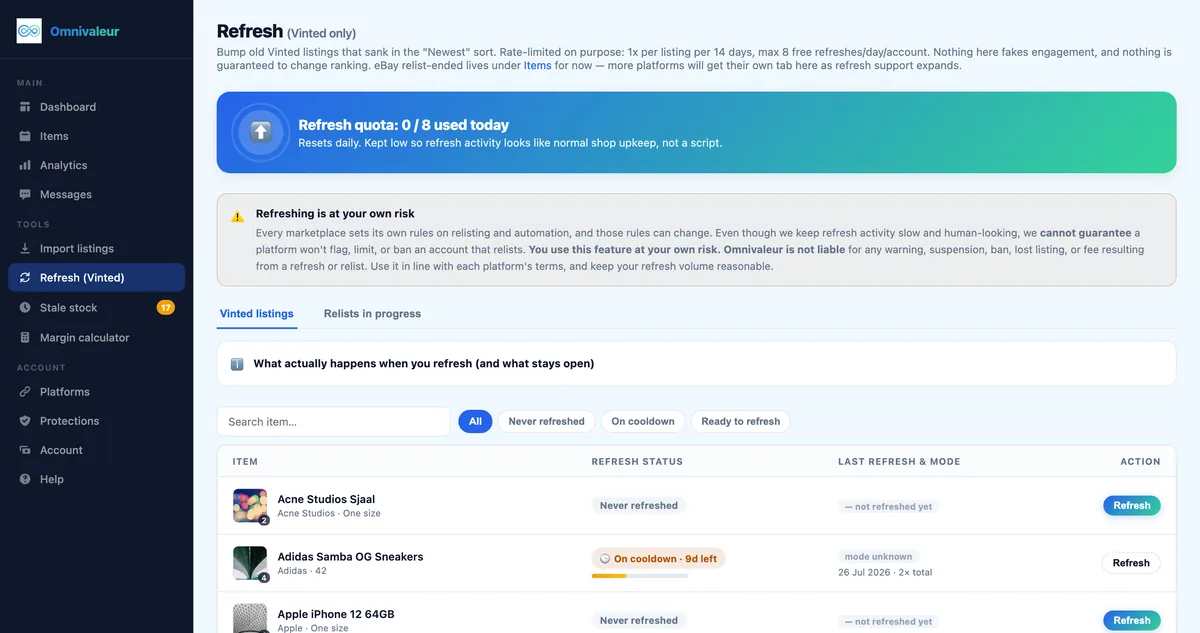
- Omnivaleur's refresh tool caps itself at 8 free refreshes a day because no automation can guarantee Vinted won't flag an account
- Profit shown from real sale price, not asking price, typically differs by 10 to 20 percent on second-hand marketplaces
Can I sync my Shopify store with Vinted?
Yes, but not the way you sync Shopify with, say, a Shopify POS terminal. Vinted doesn't publish a seller API, so there's no official "connect your store" button inside Vinted's settings. Every tool that claims to sync Shopify and Vinted — including Omnivaleur — is really pulling product data out of Shopify's product and inventory system and then automating the creation, editing, and removal of listings on Vinted's web interface on your behalf.
That distinction matters because it sets expectations correctly. A "sync" between Shopify and a true API-based marketplace (Amazon, eBay) can update in near-real time. A Shopify-to-Vinted sync works on polling cycles: the tool checks your Shopify stock every few minutes, checks your Vinted listing status every few minutes, and reconciles the two. In 2026, most reputable tools reconcile stock within 5–15 minutes of a sale, not instantly. If you're running a store with fast-moving items, plan for that small window.
The practical upshot: you can absolutely build a workflow where Shopify is your source of truth for inventory, photos, and descriptions, and Vinted becomes one more sales channel fed from that single catalog. You just can't treat it as a plug-and-play API connection the way you might with a native Shopify app for Amazon or Google Shopping.
How does the Shopify to Vinted integration sync work in practice?
Under the hood, a Shopify-to-Vinted crosslisting tool does four things on a loop:
- Reads your Shopify catalog — title, description, price, images, variants, SKU, and quantity, pulled through Shopify's product API.
- Maps that data to Vinted's structure — Vinted doesn't use Shopify's free-form category tree. It needs a specific category, brand (from a fixed list), size (standardized per category), condition (one of five states), and material tags. A good tool maps these automatically based on your Shopify tags and product type; a bad one leaves you re-entering everything by hand for every item.
- Publishes or updates the Vinted listing — new products become draft or live listings; price or stock changes on Shopify push an edit to the matching Vinted listing.
- Watches for sales on either side — when an item sells on Vinted, the tool needs to tell Shopify to drop the stock count (and vice versa) so you don't sell the same physical item twice.
Because Vinted listings are built for unique, single-quantity items (it's a peer-to-peer resale app, not a multi-unit storefront), a Shopify product with "quantity: 12" doesn't translate cleanly. Most tools either create 12 separate Vinted listings (messy, and Vinted's spam detection doesn't love near-identical listings posted back to back) or cap the sync at one live listing per SKU and queue the rest. Know which behavior your tool uses before you crosslist a multi-unit SKU — it changes how you plan restocks.
What happens when an item sells on Shopify or on the linked Vinted account?
This is the question that actually determines whether you oversell. Here's the realistic sequence:
- Sale happens on Vinted. The buyer pays, Vinted notifies the seller. A crosslisting tool detects this on its next polling cycle (typically within minutes) and marks the matching Shopify product as out of stock or deletes/closes the listing on every other connected channel.
- Sale happens on Shopify. Your Shopify order triggers a webhook almost instantly (Shopify's side is fast — it's the native API). The tool then needs to close the corresponding Vinted listing, which means logging into the automated Vinted session and deleting or marking the item sold, since Vinted itself has no "mark as sold elsewhere" button built for third-party apps.
The gap you need to plan for is the delay between "sold somewhere" and "removed everywhere." Most tools advertise 5–30 minutes. If you sell high-demand, single-unit items (a specific vintage jacket, a limited sneaker), that window is where double-sales happen. The fix isn't a faster sync — it's discipline: don't crosslist your single rarest items to more than two or three channels at once, and check your dashboard before accepting manual offers on Vinted.
If you're also running Marktplaats or 2dehands alongside Shopify and Vinted, the same oversell risk multiplies with every added channel — our guide on how to avoid selling the same item twice across Marktplaats and Vinted covers the manual safety checks worth keeping even when automation is running.
How do I export my items from Shopify to Vinted step by step?
A working setup, start to finish, usually looks like this:
- Connect your Shopify store to your crosslisting tool using the official Shopify app installation (never share your admin password with a third party — always use the OAuth connection).
- Choose which products or collections to export. Don't push your entire catalog on day one. Start with a collection of 20-50 items that are genuinely suited to Vinted — clothing, shoes, accessories, and small collectibles perform; bulky furniture or multi-packs don't.
- Map categories and conditions. Vinted's five condition states (new with tags, new without tags, very good, good, satisfactory) rarely match Shopify's generic "in stock / sold out" status. Set a default condition per collection and adjust individual outliers manually.
- Adjust pricing for Vinted's fee model. Vinted charges the buyer a protection fee on top of your asking price — you don't lose a cut, but buyers do compare your price against similar Vinted listings, not your Shopify storefront price. Items priced identically to your webshop often look expensive once the buyer fee is added on their end.
- Review generated drafts before publishing. Automated category mapping gets it right most of the time, not all the time. Spot-check the first batch.
- Publish in batches, not all at once. Posting 50 listings in ten minutes looks like bot behavior to Vinted's spam systems. Spread a first export over a day or two.
If you're running the opposite direction — bringing existing Shopify stock from a webshop you already built on top of a Marktplaats presence — the setup steps are nearly identical; see Marktplaats to Shopify crosslisting for the mirror-image workflow.
Photo and description requirements worth fixing before export
Shopify product photos are usually shot on white backgrounds for an e-commerce catalog. Vinted buyers respond better to lifestyle or in-hand shots — Vinted's own data and seller community consistently show listings with a worn/used-context photo outperforming studio shots in click-through. If your crosslisting tool only pushes your primary Shopify image, add at least one secondary photo manually for your best sellers.
What does Shopify to Vinted crosslisting cost in 2026?
Three separate cost layers apply, and competitor comparisons often blur them together:
| Cost layer | Typical 2026 price | Who charges it |
|---|---|---|
| Shopify subscription | €24–€299/month depending on plan | Shopify |
| Crosslisting tool subscription | €15–€60/month depending on listing volume | Omnivaleur, ExportYourStore, Sellu, etc. |
| Vinted selling fees to the seller | €0 | None — Vinted charges the buyer, not the seller |
| Vinted buyer protection fee | Roughly 5%+ of item price, paid by buyer | Vinted (indirectly affects your competitive pricing) |
This is where a lot of sellers get confused by competitor pages that talk about "Shopify crosslisting fees" as if Vinted takes a cut like eBay does. It doesn't. Vinted's seller help pages confirm sellers keep 100% of their listed price — the buyer absorbs the protection fee on top. Your actual cost of crosslisting is the Shopify subscription you're already paying plus whatever the automation tool charges.
Where pricing tools differ is listing limits and refresh behavior. A tool that throttles bulk actions to protect your account is worth more than one that lets you blast 200 listings an hour and gets your account restricted in week two.
Does Shopify charge fees on marketplace sales, and is Shopify a marketplace like Vinted?
No, and no — and the difference explains almost every pricing confusion resellers run into.
Shopify is e-commerce software, not a marketplace. You own the domain, the customer relationship, and the payment processing. Shopify charges a monthly subscription plus, if you don't use Shopify Payments, a transaction fee of roughly 0.5–2% on top of your card processor's cut. There's no separate "marketplace sale" fee category inside Shopify — a sale made through your Shopify store costs the same whether the buyer found you via Google, Instagram, or a crosslisted ad.
Vinted is a C2C marketplace, built around individual listings, buyer-seller messaging, and Vinted's own shipping labels and buyer protection. There's no storefront, no custom domain, and no checkout you control. The trade-off is reach: Vinted puts your item in front of millions of app users browsing by category, size, and brand without you spending a cent on ads.
| Feature | Shopify | Vinted |
|---|---|---|
| Who sets the price | You, fully | You, but buyers compare across similar listings |
| Seller fees | Subscription + payment processing | None for private sellers |
| Buyer fees | Usually none beyond shipping/tax | Buyer protection fee on every order |
| Customer data ownership | Yours | Vinted's |
| Inventory model | Multi-quantity SKUs | Single, unique listings |
| Business account requirement | Not required to sell | Required past certain volume/profit thresholds |
Crosslisting bridges these two worlds — your multi-quantity Shopify catalog feeds single-unit Vinted listings, with the automation layer handling the translation between them.
What Vinted rules and limits catch Shopify sellers off guard in 2026?
Resellers who already run a Shopify store tend to assume Vinted treats them the same way — it doesn't, and three rule areas trip people up every year.
Business vs private seller status
If you're already running a registered Shopify business, selling the same stock on Vinted almost always means you need a Vinted business/professional seller profile, not a personal one. Vinted's own rules distinguish "occasional private sale" sellers from those selling as a trade or business — and running a connected Shopify store is a strong signal you're the latter. Check Vinted's help centre for the current threshold language before crosslisting a full Shopify catalog under a personal account.
DAC7 reporting thresholds
Since DAC7 came into force, Vinted (like other marketplaces) reports seller data to tax authorities once you cross 30 sales or €2,000 in a calendar year — whichever comes first. If your Shopify-to-Vinted crosslist pushes dozens of items a month, you'll cross that threshold quickly, and Vinted will ask for ID verification and a tax number. Our full breakdown of the 30-sales/€2,000 DAC7 rule for Dutch sellers and the parallel Belgian tax rules for Vinted sellers walk through what gets reported and when, backed by the Belastingdienst's own DAC7 seller guidance and the European Commission's DAC7 overview.
Category, size, and condition mismatches
Shopify lets you define any custom size field — "S/M," "EU 38," "One Size." Vinted enforces standardized size lists per category and country. A product that syncs fine in your Shopify admin can land in Vinted as "uncategorized" or get flagged for review if the size string doesn't match anything in Vinted's dropdown. Clean up your Shopify variant naming (stick to standard EU sizing) before a bulk export, and you'll avoid a pile of manual fixes later.
What are the most common pitfalls when crosslisting from Shopify to Vinted?
Overselling single-unit items. Already covered above, but worth repeating: any sync delay, however small, is a real risk on rare or one-off pieces. Build in a buffer — don't crosslist your only unit of a hard-to-replace item to five channels simultaneously.
Treating refresh/bump tools as risk-free. Bumping a Vinted listing to the top of search feels harmless, but Vinted monitors unusual account activity closely. Omnivaleur's own refresh tool caps itself at 8 free refreshes per day precisely because no automation tool — regardless of what its marketing claims — can guarantee a marketplace won't flag an account for aggressive automated behavior. Treat any "unlimited refresh" promise from a competitor as a red flag, not a feature.
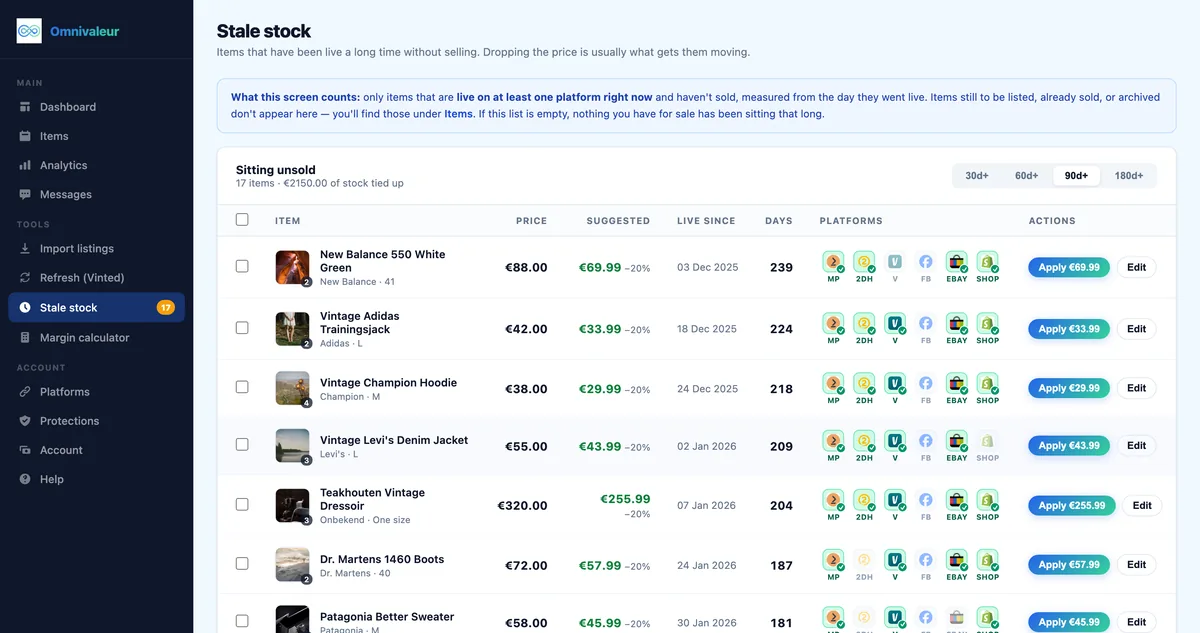
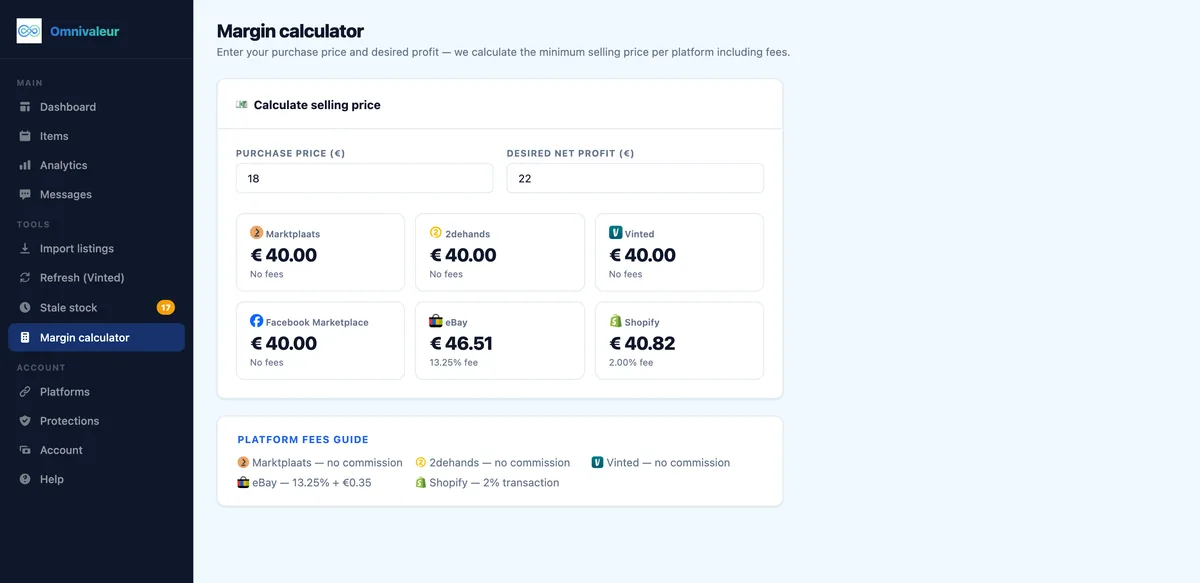
Confusing asking price with real profit. Shopify dashboards show your listed price. Vinted sales often close below the asking price through offers and negotiation — the gap between asking price and actual sale price on second-hand marketplaces typically runs 10–20%. Omnivaleur's analytics calculate profit from the real, confirmed sale price per transaction rather than the sticker price, which matters a lot if you're deciding whether a crosslisted SKU is actually worth the automation fee.
Duplicate-listing detection. Vinted's spam filters can flag near-identical descriptions posted close together — a common side effect of pushing dozens of similar Shopify variants (same jacket, five colors) in one batch. Stagger batches and vary wording slightly where your tool allows template customization.
Bundling logic gets lost in translation. If you sell multi-item sets on Shopify, Vinted buyers expect bundle discounts handled through Vinted's own bundle feature, not a single combined SKU. See how to create bundles on Vinted for how that works from the buyer and seller side — it's a separate mechanism from anything Shopify does natively.
A worked example: what Shopify-to-Vinted crosslisting actually earns
Take a mid-size reseller running a Shopify store for vintage denim, crosslisting 40 jackets a month to Vinted.
- Average Shopify listed price: €45 per jacket.
- Average actual Vinted sale price after offers/negotiation: €38 — a 15.5% gap, right in the 10–20% range typical of second-hand marketplaces.
- Shopify subscription (Basic plan): €24/month, split across all channels, not just Vinted.
- Crosslisting tool subscription: roughly €29/month for a volume tier covering 40–100 active listings.
- Vinted seller fee: €0 — the buyer pays the protection fee, not the seller.
If this seller tracked "profit" using the €45 asking price across 40 jackets, they'd project €1,800 in monthly revenue. Using the real confirmed sale price of €38, actual revenue lands closer to €1,520 — a €280 gap that matters when deciding whether the automation fee pays for itself. At €29/month for the tool, the real question isn't "does crosslisting cost too much," it's "am I tracking profit off the number that's actually true." This is exactly the distinction Omnivaleur's analytics are built around: profit calculated from the sale price the seller confirms, not the number they typed into the listing.
How do I choose between crosslisting tools for Shopify and Vinted?
Most comparison pages (including the top-ranking ones for this exact search) read like a single vendor's feature list dressed up as objective advice. A few things actually separate tools in practice:
- How it handles Vinted's lack of an API. Ask directly whether listings are automated through browser sessions or a true API — Vinted doesn't offer the latter to third parties, so any claim of "instant API sync" with Vinted specifically should be questioned.
- Refresh/bump safety limits. A tool with sane daily caps protects your account; one with no limits is optimizing for its own demo video, not your account health.
- Multi-marketplace reach beyond Vinted. If you're only ever going to sell on Shopify and Vinted, a narrow tool is fine. Most resellers eventually add Marktplaats, eBay, or 2dehands, so check whether your tool scales without a full re-setup.
- Profit reporting based on real sale price. As shown above, asking price and sale price diverge meaningfully. A dashboard that only shows listed price is misleading you about margin.
If you're actively comparing named tools, our direct breakdown in Omnivaleur vs ExportYourStore covers pricing tiers, Vinted-specific automation limits, and support quality side by side rather than through marketing copy.
How does Shopify to Vinted crosslisting compare with other routes resellers run?
Shopify-to-Vinted is one combination among many European resellers juggle. If your stock also moves through 2dehands, consider the mirrored workflow in 2dehands to Shopify crosslisting, which hits the same single-unit-vs-multi-quantity issue described above but from the opposite direction. Sellers running an Etsy shop alongside Shopify and Vinted should also look at Etsy to Vinted crosslisting automation, since Etsy's category and variant structure maps to Vinted slightly differently than Shopify's does.
The common thread across every combination: Vinted is always the "unique item, no API, manual reconciliation" side of the equation. Whatever platform you're pairing it with, the sync delay, the oversell risk on rare items, and the DAC7 threshold apply identically.
What should a first 30 days of Shopify-to-Vinted crosslisting actually look like?
Skip the temptation to export your whole catalog on day one. A realistic rollout:
- Week 1: Connect Shopify, export a 20-item test batch, verify category and size mapping manually.
- Week 2: Fix any mismatched conditions or sizes, start tracking real sale prices versus asking prices on the first few completed sales.
- Week 3: Expand to 50-100 items, stagger uploads across the week to avoid spam flags, set a shipping option default matching your usual carrier.
- Week 4: Review DAC7 exposure — if you're on pace for 30+ sales or €2,000 in the year, make sure your Vinted account and tax details are set up correctly before volume grows further.
Throughout, keep an eye on your account health inside Vinted itself — sudden restriction warnings almost always trace back to either too-rapid bulk posting or near-duplicate listings pushed in the same session.
Frequently asked questions
Can I crosslist individual Shopify product variants, like different sizes or colors, as separate Vinted listings?
Does Vinted support multi-currency pricing if my Shopify store sells outside the eurozone?
What happens if a Vinted buyer wants a return on an item that shipped from my Shopify fulfillment center?
Can I crosslist dropshipped or Shopify Collective products to Vinted?
Is there a daily limit on how many listings I can push from Shopify to Vinted?
Do I need a registered business account on Vinted if I already run a registered Shopify business?
Keep reading

Stop copying listings by hand
Omnivaleur publishes your item to every platform at once and syncs stock automatically when something sells.
Start free trial